
How To Read Your Electricity Meter
How to Read Your Electricity Meter & Submit A Reading Online
- Providing regular meter readings helps make sure your bills are accurate and based on the energy you’ve used and not estimates.
- An actual meter read records your true electricity use, but an estimated read is only a prediction. This can cause bills to be too high or too low, creating surprises when the readings are corrected.
- Actual = when we get the number directly from your meter.
- Estimate = when we estimate your usage based on past readings.
- When you, as a customer, provide us with regular actual meter readings, this ensures your billing remains accurate, and you pay for what you use.
Direct Debit Customers: Please be aware that every accepted meter reading you submit generates a new bill. This applies even if readings are submitted close together. Once issued, each bill is payable 14 days later, either by Direct Debit or your chosen payment method. This does not apply to customers on our budget payment plan.
Follow these simple steps to read your meter and submit your reading through our online service
Locate Your Electricity Meter
Your meter is usually found in one of the following places:
- Inside your office (under the stairs, in a hallway cupboard, or utility room).
- Outside in a wall box or cabinet.
- In communal areas (for shared offices or facilities).
Reading different meter types
There are three kinds of business electric meters: digital, electronic, and dial. Here's how to read them.
How to read a digital meter
Here's a typical digital meter display:
Write down numbers from left to right, ignoring any numbers in red or in a red surround.
If your tariff gives you lower-priced off-peak electricity like ECO20:20 or Economy 7, your meter may have two rows of figures as shown below:
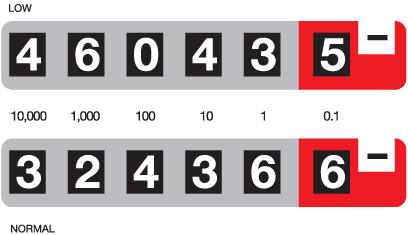
If your meter has more than one row of figures, write down all the numbers from left to right in each row, ignoring any numbers in red or in a red surround. The previous meter readings on your bill will indicate which are 'day rate' and which are 'night rate'.
How to read an electronic meter
Here's a typical electronic meter display: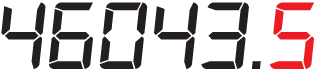
Some electronic meters have a cycle display button that you need to press to take readings, and some automatically scroll through the various displays. With a meter with two rows of figures, write down all the numbers from left to right in each display, ignoring any numbers in red or in a red surround. The previous readings on your bill will indicate which is a 'day rate' and which is the 'night rate'.
How to read a dial meter
Here's a typical electricity dial meter:
Each dial turns in the opposite direction to the one before it. Before you read your dial meter, check the direction of your dials. They may not be exactly as those illustrated above. Every dial on every meter revolves from 0 to 1, then to 9, then back to 0. In the example above, the dial meter reading shows as 45928.
To read an electric dial meter correctly:
Read the dials from left to right. If the pointer is between the two numbers, always take the lower number. If the pointer is directly over a number, write down that one. If the pointer falls between 9 and 0, write down 9 and reduce the reading you've already taken for the dial on its left by one. For example, if you originally recorded 5, reduce it to 4. Don't read the last dial on the right.
How to read my import / export meter?
To take your export meter reading please:
- Press the blue button until you see a small ‘5’ in the corner of the display.
- The reading shown beside the small ‘5’ is your export meter reading.
If your import/export meter does not have blue button like the meter above and is automatically scrolling between a T – reading and an R – reading please note that is the R – reading which shows your total exported units.